[JAVA] 좌표 설정 마우스 매크로 프로그램 개발
마우스 좌표를 설정한 후, 약간의 딜레이를 주면서 좌표로 이동 후, 클릭이 종료시까지 반복되는 간단한 코드를 Java로 짜봤다.
개인적인 목적으로 편의를 위해 개발해 본 자바 프로그램이기에 독자분들은 아마 필요하지는 않을 것으로 생각된다.
약 430줄 가량의 코드로 구성된 프로그램이고, Java Swing GUI가 자체적으로 구현되어 있는 Netbeans로 제작했다.
>Output
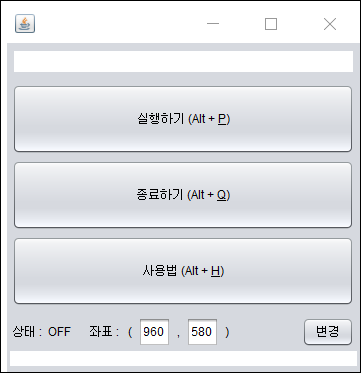
>Source
Macro.java
import javax.swing.*;
import java.awt.*;
import java.awt.AWTException;
import java.awt.Robot;
import java.awt.event.InputEvent;
import java.awt.event.KeyEvent;
import static javax.swing.KeyStroke.getKeyStroke;
/**
*
* @author Cobox_
*/
public class Macro extends javax.swing.JFrame {
/**
*
* Creates new form Macro
*/
public Macro() {
initComponents();
}
/**
* This method is called from within the constructor to initialize the form.
* WARNING: Do NOT modify this code. The content of this method is always
* regenerated by the Form Editor.
*/
@SuppressWarnings("unchecked")
// <editor-fold defaultstate="collapsed" desc="Generated Code">
private void initComponents() {
jLabel1 = new javax.swing.JLabel();
jLabel2 = new javax.swing.JLabel();
jButton1 = new javax.swing.JButton();
jButton3 = new javax.swing.JButton();
jButton4 = new javax.swing.JButton();
jLabel3 = new javax.swing.JLabel();
jLabel4 = new javax.swing.JLabel();
jLabel5 = new javax.swing.JLabel();
jLabel6 = new javax.swing.JLabel();
jLabel7 = new javax.swing.JLabel();
jLabel8 = new javax.swing.JLabel();
jTextField1 = new javax.swing.JTextField();
jTextField2 = new javax.swing.JTextField();
jButton2 = new javax.swing.JButton();
setDefaultCloseOperation(javax.swing.WindowConstants.EXIT_ON_CLOSE);
jLabel1.setFont(new java.awt.Font("맑은 고딕", 0, 16)); // NOI18N
jLabel1.setText("제목 제거");
jLabel2.setFont(new java.awt.Font("굴림", 0, 10)); // NOI18N
jLabel2.setForeground(new java.awt.Color(255, 0, 0));
jLabel2.setText("설명 제거");
jButton1.setMnemonic('p');
jButton1.setText("실행하기 (Alt + P)");
jButton1.addMouseListener(new java.awt.event.MouseAdapter() {
public void mouseClicked(java.awt.event.MouseEvent evt) {
jButton1MouseClicked(evt);
}
});
jButton1.addActionListener(new java.awt.event.ActionListener() {
public void actionPerformed(java.awt.event.ActionEvent evt) {
jButton1ActionPerformed(evt);
}
});
jButton1.addKeyListener(new java.awt.event.KeyAdapter() {
public void keyPressed(java.awt.event.KeyEvent evt) {
jButton1KeyPressed(evt);
}
public void keyTyped(java.awt.event.KeyEvent evt) {
jButton1KeyTyped(evt);
}
});
jButton3.setMnemonic('q');
jButton3.setText("종료하기 (Alt + Q)");
jButton3.addMouseListener(new java.awt.event.MouseAdapter() {
public void mouseClicked(java.awt.event.MouseEvent evt) {
jButton3MouseClicked(evt);
}
});
jButton3.addActionListener(new java.awt.event.ActionListener() {
public void actionPerformed(java.awt.event.ActionEvent evt) {
jButton3ActionPerformed(evt);
}
});
jButton4.setMnemonic('H');
jButton4.setText("사용법 (Alt + H)");
jButton4.addMouseListener(new java.awt.event.MouseAdapter() {
public void mouseClicked(java.awt.event.MouseEvent evt) {
jButton4MouseClicked(evt);
}
});
jButton4.addActionListener(new java.awt.event.ActionListener() {
public void actionPerformed(java.awt.event.ActionEvent evt) {
jButton4ActionPerformed(evt);
}
});
jButton4.addKeyListener(new java.awt.event.KeyAdapter() {
public void keyPressed(java.awt.event.KeyEvent evt) {
jButton4KeyPressed(evt);
}
public void keyTyped(java.awt.event.KeyEvent evt) {
jButton4KeyTyped(evt);
}
});
jLabel3.setText("상태 :");
jLabel4.setText("OFF");
jLabel5.setText("좌표 : ");
jLabel6.setText("(");
jLabel7.setText(",");
jLabel8.setText(")");
jTextField1.setText("960");
jTextField1.setName("xx"); // NOI18N
jTextField1.addActionListener(new java.awt.event.ActionListener() {
public void actionPerformed(java.awt.event.ActionEvent evt) {
jTextField1ActionPerformed(evt);
}
});
jTextField2.setText("580");
jTextField2.setName("yy"); // NOI18N
jTextField2.addActionListener(new java.awt.event.ActionListener() {
public void actionPerformed(java.awt.event.ActionEvent evt) {
jTextField2ActionPerformed(evt);
}
});
jButton2.setText("변경");
jButton2.addMouseListener(new java.awt.event.MouseAdapter() {
public void mouseClicked(java.awt.event.MouseEvent evt) {
jButton2MouseClicked(evt);
}
});
jButton2.addActionListener(new java.awt.event.ActionListener() {
public void actionPerformed(java.awt.event.ActionEvent evt) {
jButton2ActionPerformed(evt);
}
});
javax.swing.GroupLayout layout = new javax.swing.GroupLayout(getContentPane());
getContentPane().setLayout(layout);
layout.setHorizontalGroup(
layout.createParallelGroup(javax.swing.GroupLayout.Alignment.LEADING)
.addGroup(layout.createSequentialGroup()
.addContainerGap()
.addGroup(layout.createParallelGroup(javax.swing.GroupLayout.Alignment.LEADING)
.addComponent(jButton4, javax.swing.GroupLayout.Alignment.TRAILING, javax.swing.GroupLayout.DEFAULT_SIZE, javax.swing.GroupLayout.DEFAULT_SIZE, Short.MAX_VALUE)
.addComponent(jButton3, javax.swing.GroupLayout.Alignment.TRAILING, javax.swing.GroupLayout.DEFAULT_SIZE, javax.swing.GroupLayout.DEFAULT_SIZE, Short.MAX_VALUE)
.addComponent(jButton1, javax.swing.GroupLayout.DEFAULT_SIZE, javax.swing.GroupLayout.DEFAULT_SIZE, Short.MAX_VALUE)
.addGroup(layout.createSequentialGroup()
.addComponent(jLabel3)
.addPreferredGap(javax.swing.LayoutStyle.ComponentPlacement.RELATED)
.addComponent(jLabel4)
.addGap(18, 18, 18)
.addComponent(jLabel5)
.addPreferredGap(javax.swing.LayoutStyle.ComponentPlacement.RELATED)
.addComponent(jLabel6)
.addPreferredGap(javax.swing.LayoutStyle.ComponentPlacement.RELATED)
.addComponent(jTextField1, javax.swing.GroupLayout.PREFERRED_SIZE, javax.swing.GroupLayout.DEFAULT_SIZE, javax.swing.GroupLayout.PREFERRED_SIZE)
.addPreferredGap(javax.swing.LayoutStyle.ComponentPlacement.RELATED)
.addComponent(jLabel7)
.addPreferredGap(javax.swing.LayoutStyle.ComponentPlacement.RELATED)
.addComponent(jTextField2, javax.swing.GroupLayout.PREFERRED_SIZE, javax.swing.GroupLayout.DEFAULT_SIZE, javax.swing.GroupLayout.PREFERRED_SIZE)
.addPreferredGap(javax.swing.LayoutStyle.ComponentPlacement.RELATED)
.addComponent(jLabel8)
.addPreferredGap(javax.swing.LayoutStyle.ComponentPlacement.RELATED, javax.swing.GroupLayout.DEFAULT_SIZE, Short.MAX_VALUE)
.addComponent(jButton2))
.addGroup(layout.createSequentialGroup()
.addComponent(jLabel2)
.addGap(0, 0, Short.MAX_VALUE)))
.addContainerGap())
.addGroup(layout.createSequentialGroup()
.addGap(24, 24, 24)
.addComponent(jLabel1)
.addContainerGap(javax.swing.GroupLayout.DEFAULT_SIZE, Short.MAX_VALUE))
);
layout.setVerticalGroup(
layout.createParallelGroup(javax.swing.GroupLayout.Alignment.LEADING)
.addGroup(layout.createSequentialGroup()
.addGap(7, 7, 7)
.addComponent(jLabel1)
.addPreferredGap(javax.swing.LayoutStyle.ComponentPlacement.UNRELATED)
.addComponent(jButton1, javax.swing.GroupLayout.PREFERRED_SIZE, 70, javax.swing.GroupLayout.PREFERRED_SIZE)
.addPreferredGap(javax.swing.LayoutStyle.ComponentPlacement.RELATED)
.addComponent(jButton3, javax.swing.GroupLayout.PREFERRED_SIZE, 70, javax.swing.GroupLayout.PREFERRED_SIZE)
.addPreferredGap(javax.swing.LayoutStyle.ComponentPlacement.RELATED)
.addComponent(jButton4, javax.swing.GroupLayout.PREFERRED_SIZE, 70, javax.swing.GroupLayout.PREFERRED_SIZE)
.addGap(11, 11, 11)
.addGroup(layout.createParallelGroup(javax.swing.GroupLayout.Alignment.BASELINE)
.addComponent(jLabel3)
.addComponent(jLabel4)
.addComponent(jLabel5)
.addComponent(jLabel6)
.addComponent(jLabel7)
.addComponent(jLabel8)
.addComponent(jTextField1, javax.swing.GroupLayout.PREFERRED_SIZE, javax.swing.GroupLayout.DEFAULT_SIZE, javax.swing.GroupLayout.PREFERRED_SIZE)
.addComponent(jTextField2, javax.swing.GroupLayout.PREFERRED_SIZE, javax.swing.GroupLayout.DEFAULT_SIZE, javax.swing.GroupLayout.PREFERRED_SIZE)
.addComponent(jButton2))
.addPreferredGap(javax.swing.LayoutStyle.ComponentPlacement.RELATED, javax.swing.GroupLayout.DEFAULT_SIZE, Short.MAX_VALUE)
.addComponent(jLabel2)
.addGap(6, 6, 6))
);
pack();
}// </editor-fold>
private void jButton2ActionPerformed(java.awt.event.ActionEvent evt) {
// TODO add your handling code here:
}
private void jButton4MouseClicked(java.awt.event.MouseEvent evt) {
// TODO add your handling code here:
JOptionPane.showMessageDialog(null, "내용 제거");
JOptionPane.showMessageDialog(null, "내용 제거");
JOptionPane.showMessageDialog(null, "내용 제거");
JOptionPane.showMessageDialog(null, "내용 제거");
}
private void jButton1MouseClicked(java.awt.event.MouseEvent evt) {
// TODO add your handling code here:
String aa = jTextField1.getText().toString();
String bb = jTextField2.getText().toString();
int xd = Integer.parseInt(aa);
int yd = Integer.parseInt(bb);
//야매 코드 (이벤트마다 분리되어 변수가 공유가 안되서 계속되는 오류로 '변경'버튼 포기하고 자동 변환)
int n = JOptionPane.showOptionDialog(this, "실행하시겠습니까?", "실행", JOptionPane.YES_NO_OPTION,
JOptionPane.WARNING_MESSAGE, null, null, null);
if (n == 0) {
jLabel4.setText("ON");
int a = 2;
while(a > 1){
try {
Robot robot = new Robot();
robot.delay(2000);
robot.mouseMove(xd, yd);
robot.delay(2000);
robot.mousePress(InputEvent.BUTTON1_MASK);
robot.delay(200);
robot.mouseRelease(InputEvent.BUTTON1_MASK);
robot.delay(200);
} catch (AWTException e) {
e.printStackTrace();
}
}
} else {
jLabel4.setText("OFF");
}
}
private void jButton1ActionPerformed(java.awt.event.ActionEvent evt) {
// TODO add your handling code here:
String aa = jTextField1.getText().toString();
String bb = jTextField2.getText().toString();
int xd = Integer.parseInt(aa);
int yd = Integer.parseInt(bb);
//야매 코드 (이벤트마다 분리되어 변수가 공유가 안되서 계속되는 오류로 '변경'버튼 포기하고 자동 변환)
jButton3.setMnemonic(KeyEvent.VK_P);
int n = JOptionPane.showOptionDialog(this, "실행하시겠습니까?", "실행", JOptionPane.YES_NO_OPTION,
JOptionPane.WARNING_MESSAGE, null, null, null);
if (n == 0) {
jLabel4.setText("ON");
int a = 2;
while(a > 1){
try {
Robot robot = new Robot();
robot.delay(2000);
robot.mouseMove(xd, yd);
robot.delay(2000);
robot.mousePress(InputEvent.BUTTON1_MASK);
robot.delay(200);
robot.mouseRelease(InputEvent.BUTTON1_MASK);
robot.delay(200);
} catch (AWTException e) {
e.printStackTrace();
}
}
} else {
jLabel4.setText("OFF");
}
}
private void jButton1KeyPressed(java.awt.event.KeyEvent evt) {
// TODO add your handling code here:
}
private void jButton4KeyTyped(java.awt.event.KeyEvent evt) {
// TODO add your handling code here:
}
private void jButton4KeyPressed(java.awt.event.KeyEvent evt) {
// TODO add your handling code here:
}
private void jButton3ActionPerformed(java.awt.event.ActionEvent evt) {
// TODO add your handling code here:
jButton3.setMnemonic(KeyEvent.VK_Q);
System.exit(0);
}
private void jButton3MouseClicked(java.awt.event.MouseEvent evt) {
// TODO add your handling code here:
System.exit(0);
}
private void jButton4ActionPerformed(java.awt.event.ActionEvent evt) {
// TODO add your handling code here:
jButton4.setMnemonic(KeyEvent.VK_H);
JOptionPane.showMessageDialog(null, "내용 제거");
JOptionPane.showMessageDialog(null, "내용 제거");
JOptionPane.showMessageDialog(null, "내용 제거");
JOptionPane.showMessageDialog(null, "내용 제거");
}
private void jButton1KeyTyped(java.awt.event.KeyEvent evt) {
// TODO add your handling code here:
}
private void jTextField1ActionPerformed(java.awt.event.ActionEvent evt) {
// TODO add your handling code here:
}
private void jTextField2ActionPerformed(java.awt.event.ActionEvent evt) {
// TODO add your handling code here:
}
private void jButton2MouseClicked(java.awt.event.MouseEvent evt) {
// TODO add your handling code here:
/*
int xd = Integer.parseInt(jTextField1.getText());
int yd = Integer.parseInt(jTextField2.getText());
*/
}
/*
private void jButton2ActionPerformed(java.awt.event.ActionEvent evt) {
}
*/
/**
* @param args the command line arguments
*/
public static void main(String args[]) {
/* Set the Nimbus look and feel */
//<editor-fold defaultstate="collapsed" desc=" Look and feel setting code (optional) ">
/* If Nimbus (introduced in Java SE 6) is not available, stay with the default look and feel.
* For details see http://download.oracle.com/javase/tutorial/uiswing/lookandfeel/plaf.html
*/
try {
for (javax.swing.UIManager.LookAndFeelInfo info : javax.swing.UIManager.getInstalledLookAndFeels()) {
if ("Nimbus".equals(info.getName())) {
javax.swing.UIManager.setLookAndFeel(info.getClassName());
break;
}
}
} catch (ClassNotFoundException ex) {
java.util.logging.Logger.getLogger(Macro.class.getName()).log(java.util.logging.Level.SEVERE, null, ex);
} catch (InstantiationException ex) {
java.util.logging.Logger.getLogger(Macro.class.getName()).log(java.util.logging.Level.SEVERE, null, ex);
} catch (IllegalAccessException ex) {
java.util.logging.Logger.getLogger(Macro.class.getName()).log(java.util.logging.Level.SEVERE, null, ex);
} catch (javax.swing.UnsupportedLookAndFeelException ex) {
java.util.logging.Logger.getLogger(Macro.class.getName()).log(java.util.logging.Level.SEVERE, null, ex);
}
//</editor-fold>
//</editor-fold>
//</editor-fold>
//</editor-fold>
/* Create and display the form */
java.awt.EventQueue.invokeLater(new Runnable() {
public void run() {
new Macro().setVisible(true);
}
});
}
// Variables declaration - do not modify
private javax.swing.JButton jButton1;
private javax.swing.JButton jButton2;
private javax.swing.JButton jButton3;
private javax.swing.JButton jButton4;
private javax.swing.JLabel jLabel1;
private javax.swing.JLabel jLabel2;
private javax.swing.JLabel jLabel3;
private javax.swing.JLabel jLabel4;
private javax.swing.JLabel jLabel5;
private javax.swing.JLabel jLabel6;
private javax.swing.JLabel jLabel7;
private javax.swing.JLabel jLabel8;
private javax.swing.JTextField jTextField1;
private javax.swing.JTextField jTextField2;
// End of variables declaration
}